Use Your NAS Data Directly for AI & Analytics
If you’ve ever tried to feed NFS or SMB data from FSx for ONTAP into a SageMaker pipeline or a Bedrock Knowledge Base, you know the drill: copy the data, convert the format, refactor the app – and all of that before a single query even runs. With S3 Access Points for FSx for NetApp ONTAP(announced at AWS re:Invent 2025), those days are over.
The Problem: NAS and S3 Don’t Speak the Same Language
Traditional file workloads live on NFS or SMB shares. But modern AI/ML and analytics services on AWS almost exclusively speak S3. The result has always been the same: data pipelines that are really just glorified bridges, and storage costs that hit you twice.
The Solution: S3 Access Points Directly on ONTAP Volumes
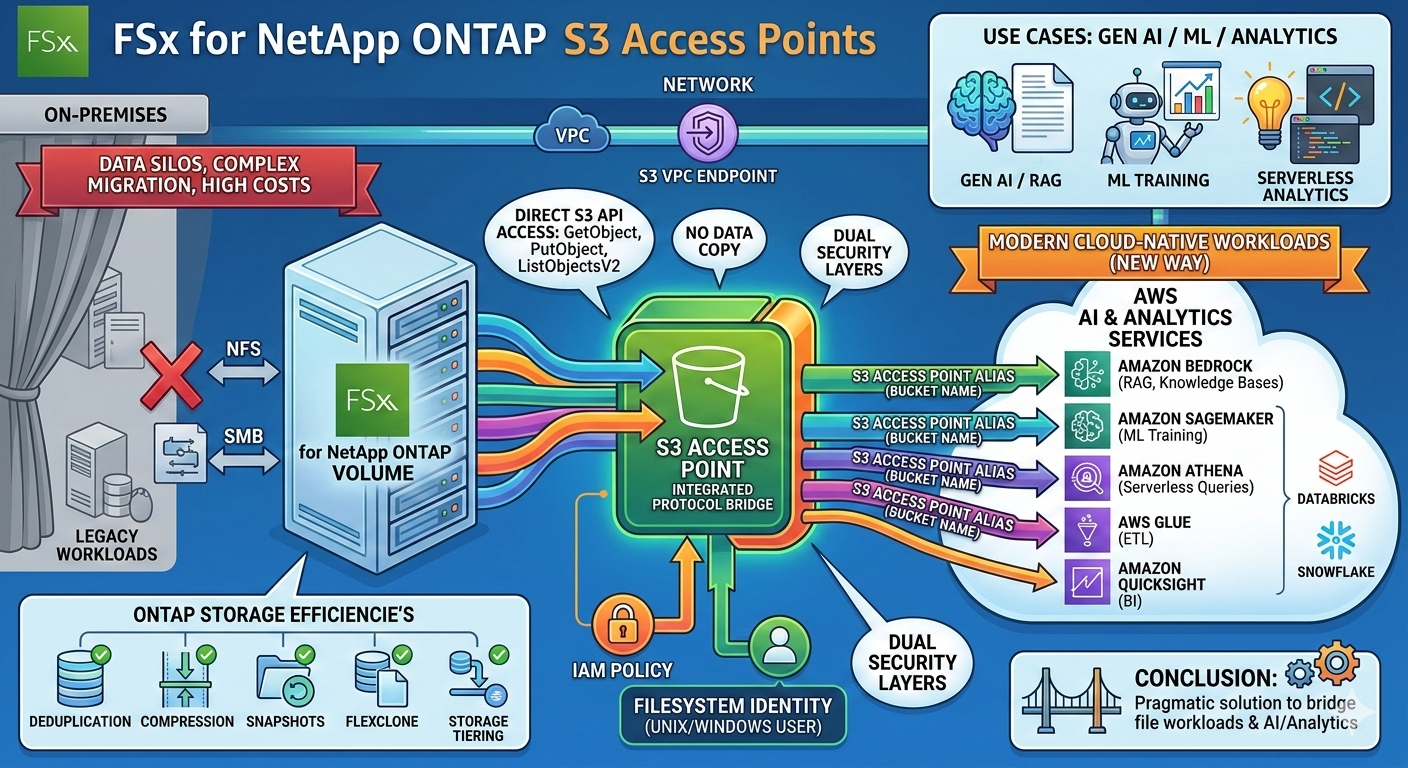
S3 Access Points for FSx for ONTAP solve this elegantly: an access point attaches directly to an ONTAP volume and exposes its contents via the S3 API – without a single byte being copied.
In practice, this means NFS/SMB data can now be accessed using standard S3 operations like GetObject, PutObject, or ListObjectsV2. From the calling application’s perspective, it looks just like a regular S3 bucket.
Access Control: IAM Meets Filesystem Identities
Each access point comes with two layers of security:
- IAM policy – controls which AWS principals are allowed to access it
- Filesystem identity – a UNIX or Windows user under which all S3 requests are authorized on the volume
On top of that: public access is blocked by default and cannot be changed. Access can also be restricted to a specific VPC – just like you’d expect from S3 VPC Access Points.
Multiple access points per volume are supported, each with its own IAM policy set and its own user identity.
Setup in Under 5 Minutes
Here’s what creating one looks like via the AWS CLI:
aws fsx create-and-attach-s3-access-point \
  --name my-ontap-ap \
  --type ONTAP \
  --ontap-configuration VolumeId=fsvol-0123456789abcdef9,FileSystemIdentity='{Type=UNIX,UnixUser:{Name=ec2-user}}' \
  --s3-access-point VpcConfiguration='{VpcId=vpc-0123467}'
You can also do this through the FSx Console or the AWS SDK. Once created, the access point gets a unique alias – this is what AWS services use as the S3 bucket name.
Use Cases: Where This Really Shines
With support for over 50 AWS services, the range of use cases is broad. Here are the most exciting scenarios for cloud engineers:
- Generative AI / RAG: Build Amazon Bedrock Knowledge Bases directly on top of existing enterprise data – no data migration, no preprocessing job
- ML Training: SageMaker training jobs read directly from NAS data
- Serverless Analytics: Run Athena queries on file data without first firing up a Glue crawler against an S3 bucket
- ETL: AWS Glue reads from and writes directly to the ONTAP volume
- BI: Amazon QuickSight can query file data directly
- Third-party tools: Snowflake and Databricks are supported as well
What Stays the Same on ONTAP
All of ONTAP’s storage efficiency features remain fully intact: deduplication, compression, snapshots, FlexClone, and storage tiering all continue to work as before. The S3 access point is purely an interface feature – the data still lives natively on ONTAP.
Latency is in line with standard S3 access – milliseconds – which is more than sufficient for most batch and streaming workloads.
Availability
S3 Access Points for FSx for ONTAP are available in all AWS regions where FSx for ONTAP is offered. No opt-in, no preview – ready to use today.
Conclusion
S3 Access Points for FSx for ONTAP are a genuine game-changer for anyone looking to bridge file workloads and cloud-native AI/analytics services. The approach is pragmatic: break down data silos not by migrating data, but by building smart protocol bridges. If you’re running ONTAP volumes and have Bedrock, SageMaker, or Athena on your radar, this feature deserves a spot at the top of your list.
Comments are closed